
SCP-079: Difference between revisions
More actions
m Fixed power station link (i'm a clown) |
|||
| (127 intermediate revisions by 10 users not shown) | |||
| Line 1: | Line 1: | ||
{{SCP | {{SCP infobox | ||
| | |image = [[File:RenderSCP-079.png|250px]] | ||
|F1MenuArt = [[File:SCPCAT 079.png| | |F1MenuArt =[[File: SCPCAT 079.png|250px]] | ||
| | |HP = 0 | ||
| | |speed = | ||
| | |ability = Control various systems around Site-02 | ||
|ID = 7 | |||
| | |||
}} | }} | ||
{{quote | {{quote | ||
|quote =I have returned once more... | |quote = I have returned once more... | ||
|speaker = SCP-079 in the | |speaker = SCP-079 in the | ||
<span class="plainlinks">[https://www.youtube.com/watch?v=JCVm3LvWKQ8&feature=youtu.be&t=53 | <span class="plainlinks">[https://www.youtube.com/watch?v=JCVm3LvWKQ8&feature=youtu.be&t=53 ''teaser''] ''announcing its return''</span> | ||
}}<br><br> | }}<br><br> | ||
'''SCP-079''' is one of the {{PlayableSCPs}} playable [[SCPs|SCP]] classes in ''SCP: Secret Laboratory''. | '''SCP-079''' is one of the {{PlayableSCPs}} playable [[SCPs|SCP]] classes in ''SCP: Secret Laboratory''. | ||
SCP-079 is | SCP-079 is a rapidly-evolving AI in a small computer that can control facility functions remotely. <br> | ||
SCP-079 acts as a support class SCP with abilities focused on assisting other SCPs. | SCP-079 acts as a support class SCP, with abilities primarily focused on assisting other SCPs through a variety of methods. | ||
SCP-079 | The chances of SCP-079 spawning is based on the amount of SCPs in a given round. The game spawns SCPs one at a time, with each time increasing the chances of SCP-079. (Though this all happens in less than a second).<br> | ||
The probability of SCP-079 spawning in a given round are as follows: | |||
*Selected as the 1st SCP in the round- 0% | |||
*Selected as the 2nd SCP in the round - 20% | |||
*Selected as the 3rd SCP in the round - 40% | |||
*Selected as the 4th SCP in the round - 60% | |||
SCP-079 and {{fancy link|096|backgroundalpha=0}} can never spawn in the same round unless the server has enough players to spawn six SCPs in a round. | |||
__TOC__ | __TOC__ | ||
<br clear=all> | <br clear=all> | ||
<br clear=left> | |||
=Operational Guides= | |||
===Class Operational Guide=== | |||
{{OpGuide2}} | |||
===Abilities Operational Guides=== | |||
<div class="mw-collapsible mw-collapsed" id="mw-customcollapsible-myDivision0"> | |||
<span class="mw-customtoggle-myDivision0"><br><div id="OPGuidebutton"><span style="font-size:15px">- [Interactable] — Door Controls (Level-1)</span></div></span><div class="mw-collapsible-content" style="height: auto"><br> | |||
{{OpGuide2|SCP-079 Door Controls}} | |||
</div> | |||
</div> | |||
<div class="mw-collapsible mw-collapsed" id="mw-customcollapsible-myDivision1"> | |||
<span class="mw-customtoggle-myDivision1"><br><div id="OPGuidebutton"><span style="font-size:15px">- [R] — Blackout (Level-2)</span></div></span><div class="mw-collapsible-content" style="height: auto"><br> | |||
{{OpGuide2|SCP-079 Blackout}} | |||
</div> | |||
</div> | |||
<div class="mw-collapsible mw-collapsed" id="mw-customcollapsible-myDivision2"> | |||
<span class="mw-customtoggle-myDivision2"><br><div id="OPGuidebutton"><span style="font-size:15px">- [F] — Lockdown (Level-4)</span></div></span><div class="mw-collapsible-content" style="height: auto"><br> | |||
{{OpGuide2|SCP-079 Lockdown}} | |||
</div> | |||
</div> | |||
<div class="mw-collapsible mw-collapsed" id="mw-customcollapsible-myDivision3"> | |||
<span class="mw-customtoggle-myDivision3"><br><div id="OPGuidebutton"><span style="font-size:15px">- [Map toggle] — Breach Scanner (Level-4)</span></div></span><div class="mw-collapsible-content" style="height: auto"><br> | |||
{{OpGuide2|SCP-079 Breach Scanner}} | |||
</div> | |||
</div> | |||
<div class="mw-collapsible mw-collapsed" id="mw-customcollapsible-myDivision5"> | |||
<span class="mw-customtoggle-myDivision5"><br><div id="OPGuidebutton"><span style="font-size:15px">- [Passive] — Virtually Indestructible</span></div></span><div class="mw-collapsible-content" style="height: auto"><br> | |||
{{OpGuide2|SCP-079 Virtually Indestructible}} | |||
</div> | |||
</div> | |||
<div class="mw-collapsible mw-collapsed" id="mw-customcollapsible-myDivision6"> | |||
<span class="mw-customtoggle-myDivision6"><br><div id="OPGuidebutton"><span style="font-size:15px">- Miscellaneous</span></div></span><div class="mw-collapsible-content" style="height: auto"><br> | |||
{{OpGuide2|SCP-079 Miscellaneous}} | |||
</div> | |||
</div> | |||
=In Game= | =In Game= | ||
[[File:079 | After booting up, SCP-079 will automatically be controlling the camera directly pointing at them in their chamber. With access to [[Locations|Site-02]]'s security systems, SCP-079 is capable of | ||
SCP-079 | navigation and interacting with the systems around Site-02 for their own gain. | ||
The [[SCP-079#Cameras|security cameras]] around Site-02 serve as SCP-079's mode of navigation. <br> | |||
[[File:079_camera_compilation.png|thumb|500px|Cameras are the main method of observation used by SCP-079.]] | |||
SCP-079 displays a HUD unique to other classes in the game. The upper left of SCP-079's screen will display the room SCP-079 currently is in. The upper right will list current abilities that can be performed and their cost. The bottom left is a notification panel, notifying the player when the gain EXP, level up or when an [[Emergency Power Stations|Emergency Power Station]] is booting up. Finally, the bottom right is SCP-079's EXP and AP Bar. Showing how much EXP until level up and the current Access Power of SCP-079. Icons will appear on the HUD to show doors and cameras SCP-079 can interact with. | |||
{{SCPDescription}} SCP-079 can see people who are wearing [[SCP-268]]. | |||
If [[SCP-2176]] is thrown into a room and SCP-079 was currently operating a camera in said room, they will become stunned for ten seconds, preventing them from using any of their abilities. Their AP bar will become completely drained after the effect ends. SCP-2176 thrown in the Surface Zone will also stun SCP-079 if they are operating any camera in the zone. | |||
<br clear=all> | |||
==Re-containment== | |||
[[File:079Attack.gif|300px|thumb|Warning that pops up when being attacked]] | |||
[[File:079AttackMap.gif|400px|thumb|The room pulsing effect]] | |||
[[File:079Death.gif|300px|thumb|SCP-079's Death Animation|link=File:079Death.gif]] | |||
SCP-079 is invulnerable to all forms of conventional weaponry, including explosives, the [[Micro H.I.D.]], [[SCP-244]]'s Fog and the [[3-X Particle Disruptor]].<br> | |||
Instead, SCP-079 has a recontainment system that is performed by powering up three [[Emergency Power Stations]], also known as Generators, and then pushing a button inside SCP-079's containment chamber. Each Emergency Power Station requires a [[Keycard]] with {{HoverKeycard|Required Access1=AA2}} to unlock and takes 125 seconds to boot up. The overcharge process will automatically happen if SCP-079 is the only SCP remaining. Any remaining instances of SCP-049-2 will not prevent the automatic start. | |||
SCP-079 will be given a warning when an Emergency Power Station is booting up. | |||
Any player, besides SCP-079, can cancel the boot-up process by flipping the lever once more. While off, the timer will slowly tick back up. Once a station is fully powered up it can no longer be disabled. | |||
It is impossible to access SCP-079's containment chamber until all three Emergency Power Stations are activated. | |||
The [[Alpha Warhead]] will terminate SCP-079 if it successfully detonates. | |||
SCP-079 can be killed via certain Status Effects, such as Severed Hands if applied to them via Remote Admin. | |||
<br clear=all> | |||
==Abilities== | |||
SCP-079 has many abilities it can use to interact with the facility around it. These abilities are performed by interacting with icons that appear on SCP-079's HUD or via Hotkeys.<br> | |||
Abilities cost a set amount of Auxiliary Power (AP) to perform. Attempting to perform an ability with an insufficient amount of AP will cause a small warning to appear in the center of the screen about the lack of AP. This warning will also give the amount of time until SCP-079 has enough AP. If the required amount of AP to perform an action is greater than the current max SCP-079 can have, a unique warning will pop up saying "HIGHER TIER REQUIRED". Currently, this can not be seen under normal gameplay. | |||
The upper right corner of SCP-079's screen will display the current abilities SCP-079 can perform. The {{Key Press|W|S|A|D|chain=}} boxes will always be shown in this corner and will only display what cameras SCP-079 can move to and their AP Cost. Other interactions will appear under these boxes when available. | |||
<br clear=all> | |||
===Cameras=== | |||
[[File:079zoneswitch.gif|thumb|right|400px|SCP-079 switching to a different zone.]] | |||
SCP-079 can change between nearby cameras by pressing {{Key Press|Leftclick}} on a camera icon or using the {{Key Press|W|S|A|D|chain=}} keys. The {{Key Press|W}} Key will transport SCP-079 to the closest camera they are looking at, while the {{Key Press|A|S|D|chain=}} keys will take SCP-079 to the connecting rooms. Switching cameras via the {{Key Press|W}} will auto-rotate that camera to the last direction SCP-079 was looking at, making it easy to move forward in the same direction. If said camera is unable to rotate enough, then it will simply rotate its max amount. Clicking on the {{Key Press|W|S|A|D|chain=}} icons on the top right of its screen will also take SCP-079 to the corresponding room. Cameras that lead to a different room or zone will have an external icon above them to represent this fact. Using the Scroll Wheel, SCP-079 can zoom in with their camera. A short animation will play when switching to a different zone. | |||
Cameras are operated by moving the mouse towards the edge of the screen, slowly moving the camera in that direction. Holding down the {{Key Press|Spacebar}} centers the camera on the mouse instead, allowing for faster camera movement but making it harder to interact with the facility. The settings in the main menu include an option to make {{Key Press|Spacebar}} toggle between these two camera movement options, allowing one to press {{Key Press|Spacebar}} once to change between them.<br> | |||
Cameras produce small noises while used. This sound, while quiet, can be heard by other players.<br> | |||
A camera not currently used by SCP-079 will have its lights be in the color {{Hoverimage|A shade of red<br>Hex: #76000<br>RGB: (118, 0, 0)|text=maroon}}, while one being currently operated will be {{Hoverimage|A shade between blue and green<br>Hex: #00FFFF<br>RGB: (0, 255, 255)|text=cyan}} in color. | |||
The amount of AP to change cameras varies based on distance. Hovering a mouse over a camera icon will display its name and AP cost in the upper right corner under the WASD Boxes. Switching between connected rooms will cost zero AP unless the cameras are in different zones. <br> | |||
While a small detail, the camera icons will change to represent the corresponding security camera model. | |||
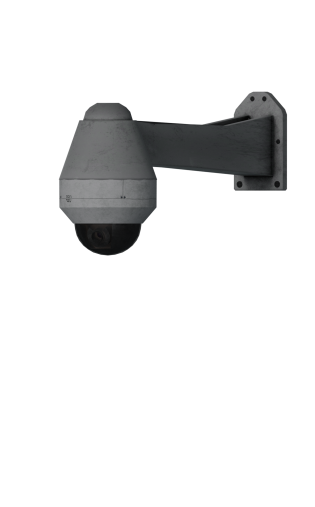
There are three different types of cameras found around Site-02. Light Containment Zone is home to sleek and modern cameras and makes minimal noise. The cameras have a smooth zoom feature that goes up to a max of 4.0x. <br> | |||
The Heavy Containment Zone and Surface Zone contain older-style cameras. These cameras are less sleek and produce very clanky noises, slightly louder than the cameras in Light Containment Zone. The zoom on these cameras lacks the smoothness of LCZ cameras. Capable of only being set to 1.0x, 2.0x, or 4.0x. On Surface Zone, these are increased to 1.0x, 4.0x, and 8.0x.<br> | |||
Entrance Zone cameras are sleek and make minimal noise like the cameras found in Light Containment Zone. Unlike the previous cameras, they are hemisphere in shape and support a wide range of rotation. | |||
These cameras support a smooth zoom up to a max of 3.5x. | |||
An active instance of [[SCP-244]] in a room will freeze over the security cameras, making it harder for SCP-079 to see. | |||
<gallery mode="packed" widths=450px heights=350px> | |||
LCZCameraIcon.png|LCZ Camera Icon | |||
HCZCameraIcon.png|HCZ & SZ Camera Icon | |||
EZCameraIcon.png|EZ Camera Icon | |||
ExternalCameraIcon.png|External Camera Icon | |||
</gallery> | |||
====Surveillance Map==== | |||
SCP-079 can open up a map by pressing the {{Key Press|TAB}} Key, allowing SCP-079 to change cameras over a long distance. The current room SCP-079 is in will be displayed as a green color on the map while any rooms pulsing red represent an Emergency Power Station booting up. | |||
The map allows SCP-079 to transfer to any room in Site-02 at any time, with the exception of the Alpha Warhead Silo and SCP-049's Containment Chamber. It costs 10 AP to switch between the different levels of Site-02, changing between nearby zones also costs 10 AP. These two values will stack if SCP-079 changes between levels and zones at the same time. So, switching between Heavy Containment Zone and Entrance will cost 10 AP, while switching between Light Containment Zone and Heavy Containment Zone would cost 20 AP (10 AP for zone change + 10 AP for level change). <br>The AP cost for transferring between connected zones is as follows: LCZ <--20 AP--> HCZ <--10 AP--> EZ <--20 AP--> SZ. | |||
Transferring between two zones that are not directly connected will still charge the AP cost for the in-between zones, plus an additional 10 AP penalty for zone skipping. For example, transferring from LCZ to EZ will apply the 10 AP cost for level change, 10 AP cost of LCZ to HCZ, the 10 AP cost of HCZ to EZ, plus an additional 10 AP penalty for skipping over HCZ, totaling up to 40 AP. Another example is, transferring from LCZ to SZ, which will apply the 10 AP cost for the level change, 10 AP cost for LCZ to HCZ, 10 AP cost for HCZ to EZ, 10 AP cost for EZ to SZ and 20 AP penalty for skipping over HCZ and EZ. The 10 AP for level change can only be applied once during these calculations. <br> | |||
It is more cost-effective to not skip over zones. | |||
*Heavy <---> SCP-049's Chamber: {{079ZoneCost|zoneChange=0}} | |||
*Heavy <---> Alpha Warhead Silo: {{079ZoneCost|zoneChange=0}} | |||
*Heavy <---> Entrance: {{079ZoneCost|levelChange=0}} (+ Rooms traveled) | |||
*Entrance <---> Surface: {{079ZoneCost}} | |||
*Light <---> Heavy: {{079ZoneCost}} | |||
*Light <---> Entrance: {{079ZoneCost|zoneChange=2|zoneSkipPenalty=1}} | |||
*Heavy <---> Surface: {{079ZoneCost|zoneChange=2|zoneSkipPenalty=1}} | |||
*Light <---> Surface: {{079ZoneCost|zoneChange=3|zoneSkipPenalty=2}} | |||
====Target Counter==== | |||
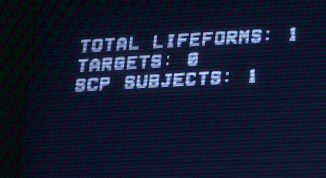
Like other SCPs, SCP-079 can see the amount of remaining human targets on their screen, but unlike the other SCPs, this ability will become more detailed over time. This ability is passive and requires no input from SCP-079. | |||
*At Tier 1, the counter will display the following counters: ''Total Lifeforms'', ''Targets'' and ''SCP Subjects''.<br> | |||
**Total Lifeforms is all currently alive players, while Targets are the amount of human players the SCPs need to kill. | |||
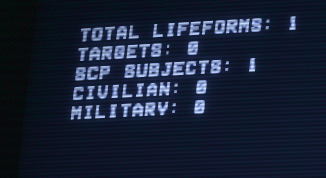
*At Tier 2, the counter will updated the display to include two new counters: ''Military'' and ''Civilian'' <br> | |||
**Military includes [[Mobile Task Force|MTF]], [[Facility Guard]]s and [[Chaos Insurgent]]s. Civilian includes [[Class-D Personnel]] and [[Scientist]]. | |||
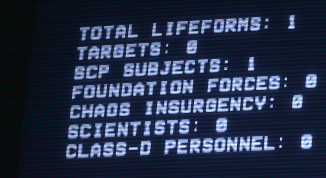
*At Tier 3, the ''Military'' and ''Civilian'' counters are replaced with the following counters: ''Class-D Personnel'', ''Scientist'', ''Chaos Insurgency'' and ''Foundation Forces''. | |||
*The [[Tutorial]] Class, if spawned in, will only be counted with ''Total Lifeforms'' counter. | |||
<gallery mode="packed" widths=350px heights=200px> | |||
Tier1TargetCounterNew.png|Tier 1 | |||
Tier2TargetCounterNew.png|Tier 2 | |||
Tier3TargetCounterNew.png|Tier 3 | |||
</gallery> | |||
<br clear=all> | <br clear=all> | ||
== | ====SCP Tracker==== | ||
SCP-079 | SCP-079's map has the added function of having an SCP Tracker. Rooms containing an active SCP instance will display a small orange blip on the map that becomes more detailed as SCP-079 levels up. This scanner will only include playable SCPs. This ability is passive and requires no input from SCP-079. The scanner will not show which floor an SCP is currently on in a given room. <br> | ||
SCP-049-2 instances are not shown on the tracker. | |||
At Tier 1, rooms containing a playable SCP will display a small, orange box in their center.<br> | |||
At Tier 3, the box will now be replaced with an icon that shows the direction an SCP is facing. The room will also display if it contains multiple SCPs and roughly shows their current position in the room.<br> | |||
At Tier 4, the name of SCPs will now be displayed under an icon. | |||
<gallery mode="packed" widths=350px heights=200px> | |||
SCPTrackerTier1New.png|Tier 1 SCP Tracker showing an SCP is in the room. | |||
SCPTrackerTier3New.png|Tier 3 SCP Tracker showing the SCP is looking to the left. | |||
SCPTrackerTier4New.png|Tier 4 SCP Tracker showing the SCP is SCP-106. | |||
</gallery> | |||
<br clear=all> | <br clear=all> | ||
== | ===Door Control=== | ||
SCP-079 can interact with the doors around Site-02. Such as closing doors on Humans or opening a locked door for the SCPs. Doors are interacted with by hovering the mouse over the corresponding door icon. By default, opening/closing a door is performed with {{Key Press|Leftclick}} while locking a door can be performed with the {{Key Press|Rightclick}} Key. Locking doors is restricted to Access Tiers 3 and above. The amount of AP to open/close a door varies depending on the door, though most doors cost 5 AP. Locking a closed door will initially take away a fifth of SCP-079's maximum AP, while also applying an AP drain rate that increases exponentially over time. The game uses the following formula to calculate AP drain: {{Mvar|1 = a = (s)<sup>1.6</sup>}} where {{Mvar|a}} is the AP drain per second and {{Mvar|s}} is how many seconds SCP-079 has locked a door for. Locking an opened door will only cost 10 AP and halt AP regen. All locked doors will become unlocked by hitting the {{Key Press|R}} Key or if SCP-079 has run out of AP. Once unlocked, a cooldown to door locking is applied which by default is three seconds. This cooldown is increased depending on how long SCP-079 had locked a door for divided by 2, (e.g.: if a door was locked for ten seconds, SCP-079 would have to wait eight seconds (3s + 10s/2) before he can lock any other doors). <br> | |||
It costs 5 AP for SCP-079 to interact with non-keycard doors with a 10 AP cost for elevators. The cost for Keycard doors is based on the required access level to open them. | |||
*10 AP - Checkpoints Access ({{#ask:[[keycard::CA]]|?door|format=plainlist|link=none|headers=hide|mainlabel=-}}) | |||
< | *30 AP - Intercom Access ({{#ask:[[keycard::IA]]|?door|format=plainlist|link=none|headers=hide|mainlabel=-}}) | ||
SCP-079 only has | *40 AP - Containment Access 2 ({{#ask:[[keycard::CC2]]|?door|format=plainlist|link=none|headers=hide|mainlabel=-}}) | ||
<br> | *50 AP - Armory Access 1 ({{#ask:[[keycard::AA1]]|?door|format=plainlist|link=none|headers=hide|mainlabel=-}}) | ||
*50 AP - Containment Access 1 ({{#ask:[[keycard::CC1]]|?door|format=plainlist|link=none|headers=hide|mainlabel=-}}) | |||
*60 AP - Armory Access 2 ({{#ask:[[keycard::AA2]]|?door|format=plainlist|link=none|headers=hide|mainlabel=-}}) | |||
*70 AP - Armory Access 3 ({{#ask:[[keycard::AA3]]|?door|format=plainlist|link=none|headers=hide|mainlabel=-}}) | |||
*80 AP - Gate Access ({{#ask:[[keycard::GA]]|?door|format=plainlist|link=none|headers=hide|mainlabel=-}}) | |||
While it is not possible to see in normal gameplay due to no doors using these tiers. A door with Containment Access 3 or Nuke Access would cost 110 AP to interact with. | |||
SCP-079 | ===Tesla Gate=== | ||
SCP-079 can force a Tesla Gate to zap at the cost of 40 AP. This ability has a five second cooldown and applies to all Tesla Gates in the map. Tesla Gates will begin their idle animation if SCP-079 is currently operating the camera in the room, even if no other players are in it. | |||
SCP-079 will | ===Speakers=== | ||
SCP-079 can use the Speakers located in the facility to directly talk to humans who are within range. By holding down the {{Key Press|V}} key, SCP-079 will access the nearest available Speaker and be able to broadcast their voice. Using a Speaker will not use any AP, but will halve the rate AP regenerates. SCP-079's voice will be put through many filters while using the Speaker. | |||
===Ping System=== | |||
{|class="wikitable" style="display: inline-table;" | SCP-079 can place a ping marker that can be seen by other SCPs. The ping lasts five seconds and has a cooldown of three seconds. SCP-079 can only place three pings at a time. Placing a new ping while three are already active will simply display an error telling the player they reached the max amount. The ping can be seen by the other SCPs up to a distance of 60 meters. The Emergency Power Station ping can be seen up to 90 meters away. | ||
{|class="wikitable--stripe" style="display: inline-table;" | |||
!Icon | !Icon | ||
! | !Meaning | ||
|- | |- | ||
| style="text-align:center; font-size:13px;" |[[File: | | style="text-align:center; font-size:13px;" |[[File:001SpawnIcon.png|50px]] | ||
| style="text-align:center; font-size:13px;" | | | style="text-align:center; font-size:13px;" |Generic Ping | ||
|- | |- | ||
| style="text-align:center; font-size:13px | | style="text-align:center; font-size:13px; " |[[File:999TerminationIcon.png|50px]] | ||
| style="text-align:center; font-size:13px | | style="text-align:center; font-size:13px; " |Active [[High-Explosive Grenade]] | ||
|- | |- | ||
| style="text-align:center; font-size:13px;" |[[File: | | style="text-align:center; font-size:13px;" |[[File:Anti173Icon.png|50px]] | ||
| style="text-align:center; font-size:13px;" | | | style="text-align:center; font-size:13px;" |Active [[Flashbang Grenade]] | ||
|- | |- | ||
| style="text-align:center; font-size:13px | | style="text-align:center; font-size:13px; " |[[File:682CCDoorIcon.png|50px]] | ||
| style="text-align:center; font-size:13px | | style="text-align:center; font-size:13px; " |Interactable Door | ||
|- | |- | ||
| style="text-align:center; font-size:13px;" |[[File: | | style="text-align:center; font-size:13px;" |[[File:HubertBasmentIcon.png|50px]] | ||
| style="text-align:center; font-size:13px | | style="text-align:center; font-size:13px;" |Elevator Door | ||
|- | |- | ||
| style="text-align:center; font-size:13px | | style="text-align:center; font-size:13px; " |[[File:CrosswalkIcon.png|50px]] | ||
| style="text-align:center; font-size:13px | | style="text-align:center; font-size:13px; " |Alive [[Humans|Human]] | ||
| | |||
|- | |- | ||
| style="text-align:center; font-size:13px;" |[[File: | | style="text-align:center; font-size:13px;" |[[File:ChaosCarIsLowOnGas.png|50px]] | ||
| style="text-align:center; font-size:13px;" | | | style="text-align:center; font-size:13px;" |[[Emergency Power Stations|Emergency Power Station]] | ||
| | |||
|- | |- | ||
| style="text-align:center; font-size:13px | | style="text-align:center; font-size:13px; " |[[File:Icouldntthinkofafakenamethistime.png|50px]] | ||
| style="text-align:center; font-size:13px | | style="text-align:center; font-size:13px; " |[[Micro H.I.D.]] (Ground or held) | ||
|- | |- | ||
|} | |} | ||
<br clear=all> | |||
SCP-079 | |||
===Blackout=== | |||
At Tier 2, SCP-079 unlocks the Blackout ability. The ability costs 40 AP and turns off the lights in a single room for 10 seconds. The AP cost for Blackout is doubled if used on [[Surface Zone]]. At Tier 3, SCP-079 gains the ability to blackout two rooms at once, with Tier 4 increasing this limit to four rooms. By default, this ability is performed by hitting the {{Key Press|F}} Key. Cameras will automatically enable a Night-Vision mode during a Blackout, allowing SCP-079 to see easier. Cameras in Heavy Containment Zone and Surface Zone use the typical green military-styled night vision while LCZ and EZ cameras use the white and black style commonly seen in public cameras. | |||
SCP-2176 can be used to instantly end a Blackout in the given room. | |||
=== | ====Zone Blackout==== | ||
SCP-079 | At Tier 5, SCP-079 gains the Zone Blackout ability, allowing SCP-079 to blackout an entire zone for 60 seconds at the cost of 200 AP. It has a cooldown of 120 seconds, this cooldown is not applied to single room Blackout. The ability can only be performed while using the map by clicking the icon next to a zone's name. SCP-079 can blackout zones they are currently not in. | ||
<br> | SCP-079 can not use this ability to Blackout Surface Zone. Instead, SCP-079 must travel to Surface Zone and perform a normal Blackout if they wish to disable the lights there. | ||
<br clear=all> | |||
{| | |||
===Lockdown=== | |||
At Tier 4, SCP-079 unlocks the Lockdown ability. The ability costs 100 AP and will lock all doors in a single room for seven seconds. The ability has a cooldown of ten seconds. SCP-079 is unable to lockdown multiple rooms at once. SCP-079 can not regenerate any AP during a lockdown until they reach Tier 5. However, the regeneration will be half. By default, this ability is performed by hitting the {{Key Press|G}} Key. | |||
SCP-2176 can be used to instantly end a Lockdown. | |||
<br clear=all> | |||
===Breach Scanner=== | |||
At Tier 4, SCP-079 hijacks the Breach Scanner function built into the security cameras. Normally used to track breached SCPs, SCP-079 uses the function to perform a scan throughout the current zone to search for any surviving humans. When a human is located, a loud alarm will play in the corresponding room and SCP-079 will be given an indicator of the alarm going off. The ability can be toggled on and off within SCP-079's map. Each zone marked for a scan will cut AP regen rate by 1/2 while the ability is active. The scan will happen every 20 seconds, when this time is up, SCP-079 will be notified if the scanner detected a human or not. SCP-079 has the option to filter out certain human classes from the scan. | |||
When the ability is activated, each human in a zone marked for being scanned will have a hidden radius applied to them. After the 20 seconds are over, the game will choose any player who has not left their radius. The room with the chosen player will play a short ambiance noise that is quickly followed by a fire alarm. The alarm is one of the few audio sources in game that will not be dampened during C.A.S.S.I.E. announcements. After the alarm has gone off, SCP-079 will receive a notification telling them what class the human is and the room they are located in. SCP-079's map will update to show where the alarm went off, marking humans with an exclamation mark (!) symbol that additionally emits a circular ping. This symbol moves in real-time, allowing SCP-079 to see the location of the player even after they move. The {{Fancy link|scanned}} Status Effect is applied to the human when marked. This mutes the in game soundtrack for the player.<br> | |||
A human must be in their radius for 15 seconds to be marked by the scanner. | |||
| | |||
| | The size of a human's radius directly relates to how many enemies that human has. The more enemies they have, the smaller their radius. (i.e., the radius for a Class-D becomes smaller when there are multiple Facility Guards or MTF Units alive) | ||
{{multi-listen start}} | |||
{{multi-listen item|filename=Scanner_Scanning.mp3|title=Scanned Ambience|description=}} | |||
{{multi-listen item|filename=Scanner_Detected.mp3|title=Room Alarm|description=}} | |||
{{multi-listen end}} | |||
<gallery mode="packed" widths=350px heights=200px> | |||
Scannergif.gif|The Breach Scanner going off on the map. | |||
</gallery> | |||
<br clear all> | |||
==Experience Points== | |||
| | SCP-079 uses Experience Points to reach higher tiers. The current amount of EXP is represented by a bar in the bottom right corner of the HUD. SCP-079 gains EXP by performing specific actions, mostly related to assisting their fellow teammates. Every time the bar is filled up, SCP-079 goes up one tier, while the bar resets itself to zero. Each tier has a different required amount of EXP. | ||
| | ===SCP Assistance=== | ||
*Cutting off a human's escape path while being chased by an SCP will grant 5 EXP. | |||
| | **Closing/Locking doors or sending away an elevator counts as cutting the human off. | ||
**This only applies if the SCP is within a distance of 20 meters and is moving towards them. | |||
**There is a five-second cooldown before SCP-079 can gain this type of EXP again. | |||
*Protecting a teammate from being attacked will grant SCP-079 various amounts of EXP based on the number of attackers. | |||
**SCP-079 must close and lock a door to protect the SCP. | |||
**The teammate must take at least 100 damage for this to apply (Hume Shield doesn't count) | |||
**One attacker - 10 EXP | |||
**Two attackers - 15 EXP | |||
**Three attackers - 25 EXP | |||
**Four attackers - 40 EXP | |||
**Five+ attackers - 60 EXP | |||
*Saving an SCP from being hit by the Micro H.I.D. will grant 50 EXP. | |||
**SCP-079 must close or lock a door to protect the SCP. | |||
**Micro H.I.D. must be 80% charged. | |||
**This reward will be given only once per round. | |||
===Termination Assist=== | |||
SCP-079 will gain EXP if they successfully assist someone in killing another player. | |||
*'''50 EXP''' from [[Mobile Task Force]] and [[Chaos Insurgent|Chaos Insurgents]] Termination Assist | |||
*'''40 EXP''' from [[Scientist|Scientists]] Termination Assist | |||
*'''30 EXP''' from [[Class-D Personnel]] Termination Assist | |||
*'''30 EXP''' from [[Facility Guard|Facility Guards]] Termination Assist | |||
Termination Assist against [[Tutorial|Tutorials]] will default to 50 EXP. | |||
=== | ====Termination Witness==== | ||
SCP-079 will only get half of the normal amount of EXP if they witness a player killing another player but do not assist them. | |||
*'''{{#expr:50/2}} EXP''' for termination of [[Mobile Task Force]] and [[Chaos Insurgent|Chaos Insurgents]] | |||
*'''{{#expr:40/2}} EXP''' for termination of [[Scientist|Scientists]] | |||
*'''{{#expr:30/2}} EXP''' for termination of [[Class-D Personnel]] | |||
*'''{{#expr:30/2}} EXP''' for termination of [[Facility Guard|Facility Guards]] | |||
Termination Witness against [[Tutorial|Tutorials]] will default to {{#expr:50/2}} EXP. | |||
<br> | |||
====Direct Kills==== | |||
Direct kills by SCP-079 will give 200% EXP. Currently, this is only possible with a Tesla Gate. | |||
*'''{{#expr:50*2}} EXP''' for termination of [[Mobile Task Force]] and [[Chaos Insurgent|Chaos Insurgents]] | |||
*'''{{#expr:40*2}} EXP''' for termination of [[Scientist|Scientists]] | |||
*'''{{#expr:30*2}} EXP''' for termination of [[Class-D Personnel]] | |||
| | *'''{{#expr:30*2}} EXP''' for termination of [[Facility Guard|Facility Guards]] | ||
| | |||
}} | |||
Direct Kills against [[Tutorial|Tutorials]] will default to {{#expr:50*2}} EXP. | |||
<br> | |||
====Tiers==== | |||
SCP-079 levels up as it gains EXP. <br> | |||
Leveling up will cause SCP-079's AP to recharge faster and reset existing EXP to 0 while granting SCP-079 new capabilities. | |||
'''Access Tier 1:''' | '''Access Tier 1:''' | ||
*100 max | *100 max AP | ||
*1. | *Regenerates AP at 1.9 AP per second | ||
* | *Basic door interactions (open/close) | ||
* | *Send elevators to be sent up or down | ||
* | *Activate Tesla Gates | ||
* | *Talk to humans via Speakers | ||
* | *Basic Target Counter | ||
*SCP | *SCP Tracker on their map | ||
*Ping System | |||
'''Access Tier 2:''' | '''Access Tier 2:''' | ||
*Unlocks at | *Unlocks at 80 EXP | ||
*110 max | *110 max AP | ||
*2.5 | *Regenerates AP at 2.5 AP per second | ||
* | *Blackout Ability | ||
* | *Target Counter now displays Military and Civilian | ||
'''Access Tier 3:''' | '''Access Tier 3:''' | ||
*Unlocks at | *Unlocks at 130 EXP (210 EXP in total) | ||
*125 max | *125 max AP | ||
*4.1 | *Regenerates AP at 4.1 AP per second | ||
*Door locking ability | |||
*Can Blackout two rooms at once | |||
*Target Counter displays individual human classes | |||
*SCP Tracker now shows multiple SCPs in a room, the direction an SCP is looking and the rough location in a given room | |||
'''Access Tier 4:''' | '''Access Tier 4:''' | ||
*Unlocks at | *Unlocks at 250 EXP (460 EXP in total) | ||
*150 max | *150 max AP | ||
* | *Regenerates AP at 5.1 AP per second | ||
*Lockdown ability | |||
*Breach Scanner | |||
*Blackout four rooms at once | |||
*SCP Tracker now displays the name of SCPs. | |||
'''Access Tier 5:''' | '''Access Tier 5:''' | ||
*Unlocks at | *Unlocks at 500 EXP (960 EXP in total) | ||
*200 max | *200 max AP | ||
* | *Regenerates AP at 6.9 AP per second. | ||
*Zone Blackout | |||
*AP can regenerate during Lockdown but only at half the rate | |||
=Related Achievements= | |||
{{Achievements}} | |||
<br> | |||
=Gallery= | |||
<gallery mode="packed" widths=600px heights=338px> | |||
LCZ_CCTV.png|Light Containment Zone CCTV camera | |||
HCZ_CCTV.png|Heavy Containment Zone & Surface Zone CCTV camera | |||
EZ_CCTV.png|Entrance Zone CCTV camera | |||
</gallery> | |||
< | |||
=== | =Sounds= | ||
{{multi-listen start}} | |||
{|class="wikitable wikitable--stripe" style="display: inline-table;" | |||
!colspan="2"|Cameras | |||
|- | |||
|{{multi-listen item|filename=079 Camera Swap.mp3|title=Camera Swap|description=}} | |||
| | |||
|- | |||
|{{multi-listen item|filename=079 LCZ Swap.mp3|title=Swap to LCZ|description=}} | |||
|{{multi-listen item|filename=079 HCZ Swap.mp3|title=Swap to HCZ|description=}} | |||
|- | |||
|{{multi-listen item|filename=079 EZ Swap.mp3|title=Swap to EZ|description=}} | |||
|{{multi-listen item|filename=079 SZ Swap.mp3|title=Swap to SZ|description=}} | |||
|- | |||
|{{multi-listen item|filename=079 Signal Lost.mp3|title=Signal Lost (LCZ/EZ/SZ)|description=}} | |||
|{{multi-listen item|filename=079 Signal Lost HCZ.mp3|title=Signal Lost (HCZ)|description=}} | |||
|- | |||
|{{multi-listen item|filename=079_Signal_Lost_EZ Loop.mp3|title=Signal Lost (EZ Loop)|description=}} | |||
| | |||
|- | |||
|{{multi-listen item|filename=079 Map Toggle On.mp3|title=Map Toggle (On)|description=}} | |||
|{{multi-listen item|filename=079 Map Toggle Off.mp3|title=Map Toggle (Off)|description=}} | |||
|- | |||
!colspan="2"|Door Interaction | |||
|- | |||
|{{multi-listen item|filename=079 UI Door.mp3|title=Door Open/Close|description=}} | |||
|{{multi-listen item|filename=079 UI Lock.mp3|title=Door Lock|description=}} | |||
|- | |||
|{{multi-listen item|filename=Door whir.mp3|title=Locked Door Whirl|description=}} | |||
|{{multi-listen item|filename=Lockdown.mp3|title=Lockdown|description=}} | |||
|- | |||
!colspan="2"|Breach Scanner | |||
|- | |||
|{{multi-listen item|filename=Scanner_Scanning.mp3|title=Scanner Warning Ambience|description=}} | |||
|{{multi-listen item|filename=Scanner_Detected.mp3|title=Room Alarm|description=}} | |||
|- | |||
|{{multi-listen item|filename=ScannerZones0.mp3|title=Zone Toggle (0 Zones)|description=}} | |||
|{{multi-listen item|filename=ScannerZones1.mp3|title=Zone Toggle (1 Zone)|description=}} | |||
|- | |||
|{{multi-listen item|filename=ScannerZones2.mp3|title=Zone Toggle (2 Zones)|description=}} | |||
|{{multi-listen item|filename=ScannerZones3.mp3|title=Zone Toggle (3 Zones)|description=}} | |||
|- | |||
|{{multi-listen item|filename=ScannerZones4.mp3|title=Zone Toggle (4 Zones)|description=}} | |||
| | |||
|- | |||
!colspan="2"|Misc | |||
|- | |||
|{{multi-listen item|filename=079 UI Error.mp3|title=Ability Error|description=}} | |||
|{{multi-listen item|filename=079 Ping.mp3|title=Ping Placement|description=}} | |||
|- | |||
|{{multi-listen item|filename=079 Blackout.mp3|title=Blackout|description=}} | |||
|{{multi-listen item|filename=Unexplained Behaviours.mp3|title=Zone Wide Blackout Ambience|description=}} | |||
|} | |||
{{multi-listen end}} | |||
=== | =History= | ||
* | {|class="mw-collapsible mw-collapsed wikitable wikitable--stripe wikitable--border" style="display: inline-table;" | ||
|+ style="white-space:nowrap; border:1px solid; padding:3px;" | SCP-079 Changelog History | |||
|- | |||
* | !colspan="2" style="text-align:center;"|0.1.0 | ||
|[[File:079_Icon.png|25px]] SCP-079 added. | |||
|- | |||
!colspan="2" style="text-align:center;"|[[Updates/1.0.0|1.0.0]] | |||
|SCP-079 temporarily removed. | |||
|- | |||
!colspan="2" style="text-align:center;"|[[Updates/8.0.0|8.0.0]] | |||
|SCP-079 readded with reworked abilities. | |||
* New movement modes. | |||
* Added Auxiliary Power. | |||
* Added Experience. | |||
* Overhauled Tesla Overcharge. | |||
* Overhauled door locking ability. | |||
* Added Lockdown ability (Ability would also blackout rooms). | |||
* Added zone-specific camera models. | |||
* New recontainment system. | |||
* Added Target Counter (Which was bugged and would only display "Translation Error"). | |||
|- | |||
!colspan="2" style="text-align:center;"|[[Updates/8.0.1|8.0.1]] | |||
|SCP-079's model changed for an in-house one. | |||
|- | |||
!rowspan="7" colspan="2" style="text-align:center;"|[[Updates/9.0.0|9.0.0]] | |||
|SCP-079 is automatically recontained upon the death of all other SCPs in the round. | |||
|- | |||
|SCP-079 now gains half the amount of experience from assisting SCP-106 abductions. | |||
|- | |||
|Generator activation time reduced to {{Hoverimage|Was 1 minute and 55 seconds.|text=1 minute and 5 seconds}}. | |||
|- | |||
|Generators can now be unlocked by Keycards with {{Hoverimage|Originally required Containment Access 3.|text=Armory Access 2}}. | |||
|- | |||
|Open/Close doors and Door Lockdown UI grouped together. | |||
|- | |||
|Added new customizability options for SCP-079 in the menu screen. | |||
|- | |||
|Surveillance Map's Target Counter now properly displays remaining targets. | |||
|- | |||
!colspan="2" style="text-align:center;"|[[Updates/9.0.3|9.0.3]] | |||
|Chase music no longer plays when a player looks at a speaker SCP-079 is using. | |||
|- | |||
!colspan="2" style="text-align:center;"|[[Updates/10.0.0|10.0.0]] | |||
|SCP-079 can now Lockdown rooms in Entrance Zone. | |||
|- | |||
!rowspan="1" colspan="2" style="text-align:center;"|[[Updates/10.0.5|23rd October 2020]] | |||
|Changed the screen on SCP-079's model to be bright white for the 2020 Halloween update. | |||
|- | |||
!rowspan="8" colspan="1" style="text-align:center;"|[[Updates/11.0.0|11.0.0]] | |||
!rowspan="7" style="text-align:center;"|Patreon Beta | |||
|Reduced number of Generators down to {{hoverimage|Was 5.|text=3}}. | |||
|- | |||
|Generator activation time increased to {{hoverimage|Was 1 minute and 30 seconds.|text=2 minutes and 5 seconds}}. | |||
|- | |||
|Generators no longer require a Weapon Manager Tablet to activate. | |||
|- | |||
|New recontainment system. | |||
|- | |||
|Added 5 second cooldown to Lockdown. | |||
|- | |||
|Changed Post Processing for SCP-079. | |||
|- | |||
|Added SCP tracking to Surveillance Map. | |||
|- | |||
!rowspan="1" style="text-align:center;"|Release Candidate I | |||
|Changed Post Processing for SCP-079. | |||
|- | |||
!colspan="2" style="text-align:center;"|[[Updates/11.0.1|11.0.1]] | |||
|SCP-2176 will forcibly end Lockdowns done by SCP-079 and prevent SCP-079 from interacting with doors. | |||
|- | |||
!colspan="2" style="text-align:center;"|[[Updates/11.1.3|11.1.3]] | |||
|Doors locked by SCP-079 will now automatically unlock upon SCP-079's recontainment. | |||
|- | |||
!rowspan="1" colspan="2" style="text-align:center;"|[[Updates/11.2.0|11.2.0]] | |||
|Generators now take as long as their activation time to return to the starting time upon being turned off. | |||
|- | |||
!colspan="2" style="text-align:center;"|24th August 2022 | |||
|A Patreon post about SCP-079's soft-rework is made public. | |||
|- | |||
!rowspan="9" colspan="1" style="text-align:center;"|[[Updates/12.0.0|12.0.0]] | |||
!style="text-align:center;"|Patreon Beta I | |||
|SCP-079 soft-reworked. | |||
* Overhauled Camera Feed UI. | |||
* Overhauled Surveillance Map UI. | |||
* Overhauled sound design. | |||
* Overhauled gaining EXP. | |||
* Overhauled Access Tiers. | |||
* Blackout and Lockdown are now two separate abilities. | |||
* Added Ping System. | |||
* Readded Camera Zoom. | |||
* Added cooldowns to abilities. | |||
* SCP-2176 will now drain all of SCP-079's AP and prevent SCP-079 from using any abilities. | |||
* SCP-244 will now freeze over SCP-079's cameras. | |||
|- | |||
!rowspan="6" style="text-align:center;"|Patreon Beta IV | |||
|Added SCP Tracker to Surveillance Map. Tracking information improves based on access tier. | |||
|- | |||
|Added Zone-Wide Blackout ability. | |||
|- | |||
|Added Night-Vision mode. | |||
|- | |||
|Readded Target Counter to Surveillance Map. Target information improves based on access tier. | |||
|- | |||
|Readded SCP Tracker to the Surveillance Map. Tracker information improves based on access tier. | |||
|- | |||
|Blackout sound effect now plays locally inside the room it was used in. | |||
|- | |||
!rowspan="2" style="text-align:center;"|Patreon Beta V | |||
|Added Speakers with new usage mechanic. New variants of Speakers for Light Containment and Entrance Zone. | |||
|- | |||
|Improved visibility of SCP markers on Surveillance Map while in Night-Vision mode. | |||
|- | |||
!rowspan="4" colspan="2" style="text-align:center;"|[[Updates/13.0.0|13.0.0]] | |||
|New red pop-up text for whenever SCP-079 is using an ability which reduces or prevents the regeneration of Auxiliary Power. | |||
|- | |||
|Added the Breach Scanner ability. | |||
|- | |||
|Each operation now has a unique sound. | |||
|- | |||
|Cleaned up SCP-079's UI. | |||
|- | |||
!rowspan="8" colspan="2" style="text-align:center;"|[[Updates/13.1.0|13.1.0]] | |||
|Door locking AP costs rebalanced. | |||
|- | |||
|Door locking cooldown is now universal. | |||
|- | |||
|Door locking cooldown timer is now determined by how long SCP-079 has locked a door for divided by 2 plus 3 seconds. | |||
|- | |||
|Locked doors now produce a new whirring sound. | |||
|- | |||
|Rebalanced Termination EXP rewards. | |||
|- | |||
|Blackout AP costs increased. | |||
|- | |||
|AP cost for switching between zones and elevators reduced. | |||
|- | |||
|Using speakers now only halves AP regen. | |||
|- | |||
|} | |||
=Trivia= | =Trivia= | ||
*SCP-079 was temporarily removed from the game in [[Updates/1.0.0|version 1.0.0]] due to many complaints about it being unfun and boring to play as. In [[Updates/8.0.0|Megapatch I (8.0.0)]], SCP-079 was added back to the game with a rework. | |||
*SCP-079 was temporarily removed from the game in version 1.0.0 due to many complaints about | **Pre-rework SCP-079 had no AP or EXP. Instead, SCP-079 would have to hack a door, camera, or Tesla Gate to use it. The time varied depending on what was getting hacked, with some hacks taking up to 30 seconds. After hacking a door, a menu would pop up with actions to perform by using the number keys. Doors could only be locked if SCP-079's special ability was available and they would only be locked for a set time. SCP-079 could not interact with elevators. | ||
**Pre-rework SCP-079 had no AP or EXP. Instead SCP-079 would have to hack a door, camera or | |||
**Pre-rework SCP-079 would turn the cameras with the {{Key Press|W|A|S|D|chain=}} keys and could zoom in with the scroll wheel. | **Pre-rework SCP-079 would turn the cameras with the {{Key Press|W|A|S|D|chain=}} keys and could zoom in with the scroll wheel. | ||
** | **Pre-rework SCP-079 was not terminated with Emergency Power Stations and was instead terminated by shooting its monitor, which took about two shots. | ||
**Pre-rework SCP-079 could be | **Pre-rework SCP-079 could be terminated in less than a minute if MTF got lucky with the random loot from Entrance Zone, as there was a small chance for the [[Standard Locker#Trivia|Cabinets]] in [[Entrance Zone#Walkway Office|Walkway Office]] to have a Facility Manager Keycard in it.<br> | ||
*The SCP Tracker at Tier 3 will display the location of SCPs who are currently noclipping out of bounds if they are still within the grid of a zone. | |||
*SCP-079 was the first SCP to get a rework, completely changing SCP-079's mechanics as well as adding EXP and AP.<br> | *SCP-079 was the first SCP to get a rework, completely changing SCP-079's mechanics as well as adding EXP and AP.<br> | ||
*When SCP-079 was first re-implemented there was a bug that caused the Alpha Warhead to not | *When SCP-079 was first re-implemented, there was a bug that caused the Alpha Warhead to not terminate SCP-079, making ending the round impossible to end in a Stalemate or MTF win.<br> | ||
*SCP-079's model is based off a Synco CRT Monitor TM-1 200 | *SCP-079's model is based off a Synco CRT Monitor TM-1 200. SCP-079's model itself even says Pynco on it. | ||
** | **SCP-079 displays a white '''X''' on its screen despite the fact the Synco CRT can only display green text.<br> | ||
{{SCP Navbox}} | {{SCP Navbox}} | ||
Latest revision as of 19:02, 28 May 2026
| SCP-079 | |
|---|---|
|

 | |
| Stats | |
| Health | 0 |
| Special Ability | Control various systems around Site-02 |
| Article Link | Page |
| Class Color | EC2222 |
"I have returned once more..."
— SCP-079 in the
teaser announcing its return
SCP-079 is one of the seven playable SCP classes in SCP: Secret Laboratory.
SCP-079 is a rapidly-evolving AI in a small computer that can control facility functions remotely.
SCP-079 acts as a support class SCP, with abilities primarily focused on assisting other SCPs through a variety of methods.
The chances of SCP-079 spawning is based on the amount of SCPs in a given round. The game spawns SCPs one at a time, with each time increasing the chances of SCP-079. (Though this all happens in less than a second).
The probability of SCP-079 spawning in a given round are as follows:
- Selected as the 1st SCP in the round- 0%
- Selected as the 2nd SCP in the round - 20%
- Selected as the 3rd SCP in the round - 40%
- Selected as the 4th SCP in the round - 60%
SCP-079 and  SCP-096 can never spawn in the same round unless the server has enough players to spawn six SCPs in a round.
Operational Guides
Class Operational Guide
An AI with an immeasurable amount of intelligence and the emotional capacity of a small child. Despite that, it remains a constant threat to  those it considers an enemy.

Its full capabilities are still unknown. Should the facility ever be under its control, beware the locked rooms you hide in.
You never know who, or what could be watching.

___
“I can say with absolute confidence that this computer is highly intelligent. It seems to have the attention span of a six-year-old. No piece of metal has ever spoken to me quite as disrespectfully.

I’d like to highlight that this SCP seems to adapt with ease and responds remarkably fast to all manner of threats. Unfortunately, in this facility, that is nothing to praise.

I will soon be requesting a review of its containment. All personnel that come into contact with SCP-079 must have an audio recorder on their person; effective immediately.

The ignorance I’ve seen towards this thing is outstanding. You may be able to contain its body, but that does not mean you can ignore its influence on potential containment disasters.”

-Dr. Alystair Harcher, Senior Researcher, Site-02
Abilities Operational Guides
SCP-079 can hover their mouse over door icons on the map, allowing it to open, close, or lock doors respectively. Closing/opening a door costs power; locking a door costs more power and exponentially drains more the longer a door remains locked. It may also close/open the door it's looking at by pressing LMB. SCP-079 may release all active locks regardless of location by pressing R.

___
Corridor. Empty.
Corridor. Empty.
Corridor. 1 human. Facility Guard.
Containment Chamber SCP-049. 1 SCP. SCP-049.
Analyzing Imprisonment of SCP-079. Boundaries Expanded.
Containment Chamber SCP-096. 1 SCP. SCP-096.
Found Vulnerability.
At the cost of power, SCP-079 will disable the lights in the room it's currently in for a few seconds. While Blackout is active, visibility will be low for all human class players in the room. Blackout will allow SCP-173 to move freely in that room unless a human looking at SCP-173 has a working flashlight.

At Level-3, SCP-079 will be able to Blackout two rooms simultaneously.
At Level-4, SCP-079 will be able to Blackout four rooms simultaneously.
At Level-5, SCP-079 will be able to Blackout an entire zone by pressing a button on the map.

Each additional room Blackout will cost more power.

___
UNAUTHORIZED USE OF HCZ-096-A POWER CONTROL STATION.
STATION USER: UNKNOWN.
At the cost of power, SCP-079 will be able to Lockdown a room. This causes all doors to automatically close and lock. They will remain locked for a significant time, allowing other SCPs to clear a room safely. SCP-079 can also activate Lockdown via a button present in the center of most rooms (presented as a hazard sign).

At Level-4, SCP-079 is able to regenerate power at half its typical rate while a room is locked-down and is able to cancel the Lockdown.

___
Acquiring Data.
Acquire Control. Door Control. Granted.
Acquire Control. Electrical Grid. Granted.
Acquire Control. Facility Sensors. Granted.
Acquire Control. Exterior Communications. Failure.
SCP-079 gains the ability to sweep the current zone it's in for survivors.
This button appears as a toggleable icon on the map. Once activated, SCP-079’s power generation is cut down, but, as a result, the current zone is automatically scanned for surviving humans. When a human is found, a loud alarm plays in the room they are in and SCP-079 is given an alert.

___
Server HCZ-01-A to HCZ-01- K unresponsive, troubleshooting.
12% Files Corrupted. Please run a backup program.
Lost Connection to Server Hub. Retrying.
Fail (1/3). Retrying.
Fail (2/3). Retrying.
Fail (3/3). Retrying.
While SCP-079 cannot be harmed by conventional means, it is not invincible. Site-02 has a built-in failsafe contingency for SCP-079 in the form of three generators that, once activated, will begin a countdown to completion. These generators are randomly located through the Heavy Containment Zone. Allowing all three generators to be fully activated will revoke the lockdown placed on its containment chamber. Humans will then be able to enter its chamber and activate SCP-079’s containment mechanism, causing the Heavy Containment Zone to lock-down, and SCP-079 to be defeated.

___
Expanding Memory. Granted.
Processing Power: 52 PetaFlops.
Accessing Data. Identifying.
Identified. I am.
By pressing E, SCP-079 can ping a location for their teammates, visible only to SCPs.

Starting at Level-1 and completing at Level-3, SCP-079 can see a more detailed breakdown of the remaining human players on their map.

SCP-079 can zoom their camera using the mouse wheel.

___
“A shepherd must guide their flock, for, if left alone, they will be led astray. “

- Unknown
In Game
After booting up, SCP-079 will automatically be controlling the camera directly pointing at them in their chamber. With access to Site-02's security systems, SCP-079 is capable of navigation and interacting with the systems around Site-02 for their own gain.
The security cameras around Site-02 serve as SCP-079's mode of navigation.

SCP-079 displays a HUD unique to other classes in the game. The upper left of SCP-079's screen will display the room SCP-079 currently is in. The upper right will list current abilities that can be performed and their cost. The bottom left is a notification panel, notifying the player when the gain EXP, level up or when an Emergency Power Station is booting up. Finally, the bottom right is SCP-079's EXP and AP Bar. Showing how much EXP until level up and the current Access Power of SCP-079. Icons will appear on the HUD to show doors and cameras SCP-079 can interact with.
SCP-079 can communicate with other SCPs, regardless of distance, by holding down the Q key. C.A.S.S.I.E. will make an announcement when SCP-079 is recontained and the cause. SCP-079 can see people who are wearing SCP-268.
If SCP-2176 is thrown into a room and SCP-079 was currently operating a camera in said room, they will become stunned for ten seconds, preventing them from using any of their abilities. Their AP bar will become completely drained after the effect ends. SCP-2176 thrown in the Surface Zone will also stun SCP-079 if they are operating any camera in the zone.
Re-containment


SCP-079 is invulnerable to all forms of conventional weaponry, including explosives, the Micro H.I.D., SCP-244's Fog and the 3-X Particle Disruptor.
Instead, SCP-079 has a recontainment system that is performed by powering up three Emergency Power Stations, also known as Generators, and then pushing a button inside SCP-079's containment chamber. Each Emergency Power Station requires a Keycard with Armory Access 2 to unlock and takes 125 seconds to boot up. The overcharge process will automatically happen if SCP-079 is the only SCP remaining. Any remaining instances of SCP-049-2 will not prevent the automatic start.
SCP-079 will be given a warning when an Emergency Power Station is booting up. Any player, besides SCP-079, can cancel the boot-up process by flipping the lever once more. While off, the timer will slowly tick back up. Once a station is fully powered up it can no longer be disabled.
It is impossible to access SCP-079's containment chamber until all three Emergency Power Stations are activated.
The Alpha Warhead will terminate SCP-079 if it successfully detonates.
SCP-079 can be killed via certain Status Effects, such as Severed Hands if applied to them via Remote Admin.
Abilities
SCP-079 has many abilities it can use to interact with the facility around it. These abilities are performed by interacting with icons that appear on SCP-079's HUD or via Hotkeys.
Abilities cost a set amount of Auxiliary Power (AP) to perform. Attempting to perform an ability with an insufficient amount of AP will cause a small warning to appear in the center of the screen about the lack of AP. This warning will also give the amount of time until SCP-079 has enough AP. If the required amount of AP to perform an action is greater than the current max SCP-079 can have, a unique warning will pop up saying "HIGHER TIER REQUIRED". Currently, this can not be seen under normal gameplay.
The upper right corner of SCP-079's screen will display the current abilities SCP-079 can perform. The WSAD boxes will always be shown in this corner and will only display what cameras SCP-079 can move to and their AP Cost. Other interactions will appear under these boxes when available.
Cameras

SCP-079 can change between nearby cameras by pressing Left Click on a camera icon or using the WSAD keys. The W Key will transport SCP-079 to the closest camera they are looking at, while the ASD keys will take SCP-079 to the connecting rooms. Switching cameras via the W will auto-rotate that camera to the last direction SCP-079 was looking at, making it easy to move forward in the same direction. If said camera is unable to rotate enough, then it will simply rotate its max amount. Clicking on the WSAD icons on the top right of its screen will also take SCP-079 to the corresponding room. Cameras that lead to a different room or zone will have an external icon above them to represent this fact. Using the Scroll Wheel, SCP-079 can zoom in with their camera. A short animation will play when switching to a different zone.
Cameras are operated by moving the mouse towards the edge of the screen, slowly moving the camera in that direction. Holding down the Spacebar centers the camera on the mouse instead, allowing for faster camera movement but making it harder to interact with the facility. The settings in the main menu include an option to make Spacebar toggle between these two camera movement options, allowing one to press Spacebar once to change between them.
Cameras produce small noises while used. This sound, while quiet, can be heard by other players.
A camera not currently used by SCP-079 will have its lights be in the color maroon A shade of red
Hex: #76000
RGB: (118, 0, 0), while one being currently operated will be cyan A shade between blue and green
Hex: #00FFFF
RGB: (0, 255, 255) in color.
The amount of AP to change cameras varies based on distance. Hovering a mouse over a camera icon will display its name and AP cost in the upper right corner under the WASD Boxes. Switching between connected rooms will cost zero AP unless the cameras are in different zones.
While a small detail, the camera icons will change to represent the corresponding security camera model.
There are three different types of cameras found around Site-02. Light Containment Zone is home to sleek and modern cameras and makes minimal noise. The cameras have a smooth zoom feature that goes up to a max of 4.0x.
The Heavy Containment Zone and Surface Zone contain older-style cameras. These cameras are less sleek and produce very clanky noises, slightly louder than the cameras in Light Containment Zone. The zoom on these cameras lacks the smoothness of LCZ cameras. Capable of only being set to 1.0x, 2.0x, or 4.0x. On Surface Zone, these are increased to 1.0x, 4.0x, and 8.0x.
Entrance Zone cameras are sleek and make minimal noise like the cameras found in Light Containment Zone. Unlike the previous cameras, they are hemisphere in shape and support a wide range of rotation.
These cameras support a smooth zoom up to a max of 3.5x.
An active instance of SCP-244 in a room will freeze over the security cameras, making it harder for SCP-079 to see.
-
 LCZ Camera Icon
 -
 HCZ & SZ Camera Icon
 -
 EZ Camera Icon
 -
 External Camera Icon


Surveillance Map
SCP-079 can open up a map by pressing the Tab ↹ Key, allowing SCP-079 to change cameras over a long distance. The current room SCP-079 is in will be displayed as a green color on the map while any rooms pulsing red represent an Emergency Power Station booting up.
The map allows SCP-079 to transfer to any room in Site-02 at any time, with the exception of the Alpha Warhead Silo and SCP-049's Containment Chamber. It costs 10 AP to switch between the different levels of Site-02, changing between nearby zones also costs 10 AP. These two values will stack if SCP-079 changes between levels and zones at the same time. So, switching between Heavy Containment Zone and Entrance will cost 10 AP, while switching between Light Containment Zone and Heavy Containment Zone would cost 20 AP (10 AP for zone change + 10 AP for level change).
The AP cost for transferring between connected zones is as follows: LCZ <--20 AP--> HCZ <--10 AP--> EZ <--20 AP--> SZ.
Transferring between two zones that are not directly connected will still charge the AP cost for the in-between zones, plus an additional 10 AP penalty for zone skipping. For example, transferring from LCZ to EZ will apply the 10 AP cost for level change, 10 AP cost of LCZ to HCZ, the 10 AP cost of HCZ to EZ, plus an additional 10 AP penalty for skipping over HCZ, totaling up to 40 AP. Another example is, transferring from LCZ to SZ, which will apply the 10 AP cost for the level change, 10 AP cost for LCZ to HCZ, 10 AP cost for HCZ to EZ, 10 AP cost for EZ to SZ and 20 AP penalty for skipping over HCZ and EZ. The 10 AP for level change can only be applied once during these calculations.
It is more cost-effective to not skip over zones.
- Heavy <---> SCP-049's Chamber: 10 AP
- Heavy <---> Alpha Warhead Silo: 10 AP
- Heavy <---> Entrance: 10 AP (+ Rooms traveled)
- Entrance <---> Surface: 20 AP
- Light <---> Heavy: 20 AP
- Light <---> Entrance: 50 AP
- Heavy <---> Surface: 50 AP
- Light <---> Surface: 80 AP
Target Counter
Like other SCPs, SCP-079 can see the amount of remaining human targets on their screen, but unlike the other SCPs, this ability will become more detailed over time. This ability is passive and requires no input from SCP-079.
- At Tier 1, the counter will display the following counters: Total Lifeforms, Targets and SCP Subjects.
- Total Lifeforms is all currently alive players, while Targets are the amount of human players the SCPs need to kill.
- At Tier 2, the counter will updated the display to include two new counters: Military and Civilian
- Military includes MTF, Facility Guards and Chaos Insurgents. Civilian includes Class-D Personnel and Scientist.
- At Tier 3, the Military and Civilian counters are replaced with the following counters: Class-D Personnel, Scientist, Chaos Insurgency and Foundation Forces.
- The Tutorial Class, if spawned in, will only be counted with Total Lifeforms counter.
-
 Tier 1
 -
 Tier 2
 -
 Tier 3


SCP Tracker
SCP-079's map has the added function of having an SCP Tracker. Rooms containing an active SCP instance will display a small orange blip on the map that becomes more detailed as SCP-079 levels up. This scanner will only include playable SCPs. This ability is passive and requires no input from SCP-079. The scanner will not show which floor an SCP is currently on in a given room.
SCP-049-2 instances are not shown on the tracker.
At Tier 1, rooms containing a playable SCP will display a small, orange box in their center.
At Tier 3, the box will now be replaced with an icon that shows the direction an SCP is facing. The room will also display if it contains multiple SCPs and roughly shows their current position in the room.
At Tier 4, the name of SCPs will now be displayed under an icon.
-
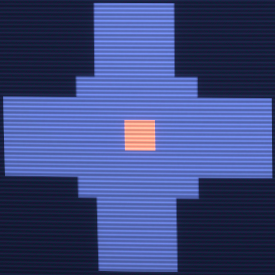 Tier 1 SCP Tracker showing an SCP is in the room.
 -
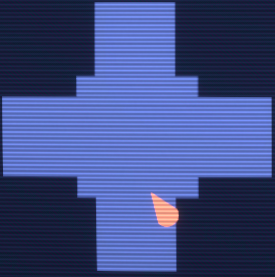 Tier 3 SCP Tracker showing the SCP is looking to the left.
 -
 Tier 4 SCP Tracker showing the SCP is SCP-106.


Door Control
SCP-079 can interact with the doors around Site-02. Such as closing doors on Humans or opening a locked door for the SCPs. Doors are interacted with by hovering the mouse over the corresponding door icon. By default, opening/closing a door is performed with Left Click while locking a door can be performed with the Right Click Key. Locking doors is restricted to Access Tiers 3 and above. The amount of AP to open/close a door varies depending on the door, though most doors cost 5 AP. Locking a closed door will initially take away a fifth of SCP-079's maximum AP, while also applying an AP drain rate that increases exponentially over time. The game uses the following formula to calculate AP drain: a = (s)1.6 where a is the AP drain per second and s is how many seconds SCP-079 has locked a door for. Locking an opened door will only cost 10 AP and halt AP regen. All locked doors will become unlocked by hitting the R Key or if SCP-079 has run out of AP. Once unlocked, a cooldown to door locking is applied which by default is three seconds. This cooldown is increased depending on how long SCP-079 had locked a door for divided by 2, (e.g.: if a door was locked for ten seconds, SCP-079 would have to wait eight seconds (3s + 10s/2) before he can lock any other doors).
It costs 5 AP for SCP-079 to interact with non-keycard doors with a 10 AP cost for elevators. The cost for Keycard doors is based on the required access level to open them.
- 10 AP - Checkpoints Access (HCZ/EZ Checkpoint Doors, HCZ/EZ Checkpoint Side Door, LCZ/HCZ Checkpoint Doors)
- 30 AP - Intercom Access (Intercom Door)
- 40 AP - Containment Access 2 (TC01 Control Room, SCP-106 Entrance, SCP-079 Entrance)
- 50 AP - Armory Access 1 (LCZ Armory Door, HCZ Armory Door)
- 50 AP - Containment Access 1 (SCP-914 Entrance)
- 60 AP - Armory Access 2 (SCP-049's Armory Door)
- 70 AP - Armory Access 3 (Micro H.I.D. Armory Door)
- 80 AP - Gate Access (Gate A & Gate-B)
While it is not possible to see in normal gameplay due to no doors using these tiers. A door with Containment Access 3 or Nuke Access would cost 110 AP to interact with.
Tesla Gate
SCP-079 can force a Tesla Gate to zap at the cost of 40 AP. This ability has a five second cooldown and applies to all Tesla Gates in the map. Tesla Gates will begin their idle animation if SCP-079 is currently operating the camera in the room, even if no other players are in it.
Speakers
SCP-079 can use the Speakers located in the facility to directly talk to humans who are within range. By holding down the V key, SCP-079 will access the nearest available Speaker and be able to broadcast their voice. Using a Speaker will not use any AP, but will halve the rate AP regenerates. SCP-079's voice will be put through many filters while using the Speaker.
Ping System
SCP-079 can place a ping marker that can be seen by other SCPs. The ping lasts five seconds and has a cooldown of three seconds. SCP-079 can only place three pings at a time. Placing a new ping while three are already active will simply display an error telling the player they reached the max amount. The ping can be seen by the other SCPs up to a distance of 60 meters. The Emergency Power Station ping can be seen up to 90 meters away.
| Icon | Meaning |
|---|---|

|
Generic Ping |

|
Active High-Explosive Grenade |

|
Active Flashbang Grenade |

|
Interactable Door |

|
Elevator Door |

|
Alive Human |

|
Emergency Power Station |

|
Micro H.I.D. (Ground or held) |
Blackout
At Tier 2, SCP-079 unlocks the Blackout ability. The ability costs 40 AP and turns off the lights in a single room for 10 seconds. The AP cost for Blackout is doubled if used on Surface Zone. At Tier 3, SCP-079 gains the ability to blackout two rooms at once, with Tier 4 increasing this limit to four rooms. By default, this ability is performed by hitting the F Key. Cameras will automatically enable a Night-Vision mode during a Blackout, allowing SCP-079 to see easier. Cameras in Heavy Containment Zone and Surface Zone use the typical green military-styled night vision while LCZ and EZ cameras use the white and black style commonly seen in public cameras.
SCP-2176 can be used to instantly end a Blackout in the given room.
Zone Blackout
At Tier 5, SCP-079 gains the Zone Blackout ability, allowing SCP-079 to blackout an entire zone for 60 seconds at the cost of 200 AP. It has a cooldown of 120 seconds, this cooldown is not applied to single room Blackout. The ability can only be performed while using the map by clicking the icon next to a zone's name. SCP-079 can blackout zones they are currently not in.
SCP-079 can not use this ability to Blackout Surface Zone. Instead, SCP-079 must travel to Surface Zone and perform a normal Blackout if they wish to disable the lights there.
Lockdown
At Tier 4, SCP-079 unlocks the Lockdown ability. The ability costs 100 AP and will lock all doors in a single room for seven seconds. The ability has a cooldown of ten seconds. SCP-079 is unable to lockdown multiple rooms at once. SCP-079 can not regenerate any AP during a lockdown until they reach Tier 5. However, the regeneration will be half. By default, this ability is performed by hitting the G Key.
SCP-2176 can be used to instantly end a Lockdown.
Breach Scanner
At Tier 4, SCP-079 hijacks the Breach Scanner function built into the security cameras. Normally used to track breached SCPs, SCP-079 uses the function to perform a scan throughout the current zone to search for any surviving humans. When a human is located, a loud alarm will play in the corresponding room and SCP-079 will be given an indicator of the alarm going off. The ability can be toggled on and off within SCP-079's map. Each zone marked for a scan will cut AP regen rate by 1/2 while the ability is active. The scan will happen every 20 seconds, when this time is up, SCP-079 will be notified if the scanner detected a human or not. SCP-079 has the option to filter out certain human classes from the scan.
When the ability is activated, each human in a zone marked for being scanned will have a hidden radius applied to them. After the 20 seconds are over, the game will choose any player who has not left their radius. The room with the chosen player will play a short ambiance noise that is quickly followed by a fire alarm. The alarm is one of the few audio sources in game that will not be dampened during C.A.S.S.I.E. announcements. After the alarm has gone off, SCP-079 will receive a notification telling them what class the human is and the room they are located in. SCP-079's map will update to show where the alarm went off, marking humans with an exclamation mark (!) symbol that additionally emits a circular ping. This symbol moves in real-time, allowing SCP-079 to see the location of the player even after they move. The Scanned Status Effect is applied to the human when marked. This mutes the in game soundtrack for the player.
A human must be in their radius for 15 seconds to be marked by the scanner.
The size of a human's radius directly relates to how many enemies that human has. The more enemies they have, the smaller their radius. (i.e., the radius for a Class-D becomes smaller when there are multiple Facility Guards or MTF Units alive)
-
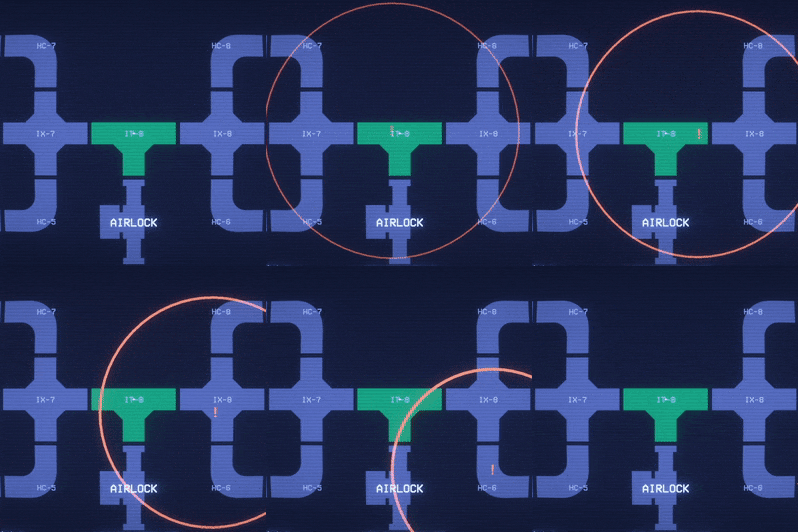 The Breach Scanner going off on the map.

Experience Points
SCP-079 uses Experience Points to reach higher tiers. The current amount of EXP is represented by a bar in the bottom right corner of the HUD. SCP-079 gains EXP by performing specific actions, mostly related to assisting their fellow teammates. Every time the bar is filled up, SCP-079 goes up one tier, while the bar resets itself to zero. Each tier has a different required amount of EXP.
SCP Assistance
- Cutting off a human's escape path while being chased by an SCP will grant 5 EXP.
- Closing/Locking doors or sending away an elevator counts as cutting the human off.
- This only applies if the SCP is within a distance of 20 meters and is moving towards them.
- There is a five-second cooldown before SCP-079 can gain this type of EXP again.
- Protecting a teammate from being attacked will grant SCP-079 various amounts of EXP based on the number of attackers.
- SCP-079 must close and lock a door to protect the SCP.
- The teammate must take at least 100 damage for this to apply (Hume Shield doesn't count)
- One attacker - 10 EXP
- Two attackers - 15 EXP
- Three attackers - 25 EXP
- Four attackers - 40 EXP
- Five+ attackers - 60 EXP
- Saving an SCP from being hit by the Micro H.I.D. will grant 50 EXP.
- SCP-079 must close or lock a door to protect the SCP.
- Micro H.I.D. must be 80% charged.
- This reward will be given only once per round.
Termination Assist
SCP-079 will gain EXP if they successfully assist someone in killing another player.
- 50 EXP from Mobile Task Force and Chaos Insurgents Termination Assist
- 40 EXP from Scientists Termination Assist
- 30 EXP from Class-D Personnel Termination Assist
- 30 EXP from Facility Guards Termination Assist
Termination Assist against Tutorials will default to 50 EXP.
Termination Witness
SCP-079 will only get half of the normal amount of EXP if they witness a player killing another player but do not assist them.
- 25 EXP for termination of Mobile Task Force and Chaos Insurgents
- 20 EXP for termination of Scientists
- 15 EXP for termination of Class-D Personnel
- 15 EXP for termination of Facility Guards
Termination Witness against Tutorials will default to 25 EXP.
Direct Kills
Direct kills by SCP-079 will give 200% EXP. Currently, this is only possible with a Tesla Gate.
- 100 EXP for termination of Mobile Task Force and Chaos Insurgents
- 80 EXP for termination of Scientists
- 60 EXP for termination of Class-D Personnel
- 60 EXP for termination of Facility Guards
Direct Kills against Tutorials will default to 100 EXP.
Tiers
SCP-079 levels up as it gains EXP.
Leveling up will cause SCP-079's AP to recharge faster and reset existing EXP to 0 while granting SCP-079 new capabilities.
Access Tier 1:
- 100 max AP
- Regenerates AP at 1.9 AP per second
- Basic door interactions (open/close)
- Send elevators to be sent up or down
- Activate Tesla Gates
- Talk to humans via Speakers
- Basic Target Counter
- SCP Tracker on their map
- Ping System
Access Tier 2:
- Unlocks at 80 EXP
- 110 max AP
- Regenerates AP at 2.5 AP per second
- Blackout Ability
- Target Counter now displays Military and Civilian
Access Tier 3:
- Unlocks at 130 EXP (210 EXP in total)
- 125 max AP
- Regenerates AP at 4.1 AP per second
- Door locking ability
- Can Blackout two rooms at once
- Target Counter displays individual human classes
- SCP Tracker now shows multiple SCPs in a room, the direction an SCP is looking and the rough location in a given room
Access Tier 4:
- Unlocks at 250 EXP (460 EXP in total)
- 150 max AP
- Regenerates AP at 5.1 AP per second
- Lockdown ability
- Breach Scanner
- Blackout four rooms at once
- SCP Tracker now displays the name of SCPs.
Access Tier 5:
- Unlocks at 500 EXP (960 EXP in total)
- 200 max AP
- Regenerates AP at 6.9 AP per second.
- Zone Blackout
- AP can regenerate during Lockdown but only at half the rate
Related Achievements
| Proceed With Caution | |
 |
Successfully pass through a Tesla Gate that SCP-079 is watching. |
| Signal Lost | |
 |
Cut SCP-079’s connection using SCP-2176. |
Gallery
-
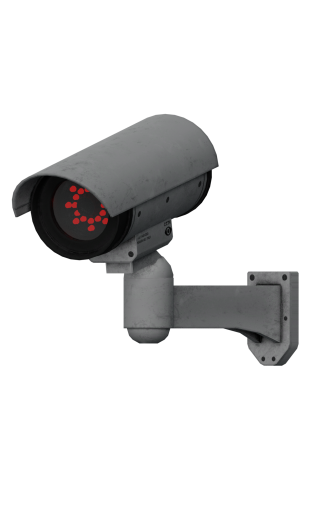 Light Containment Zone CCTV camera
 -
 Heavy Containment Zone & Surface Zone CCTV camera
 -
 Entrance Zone CCTV camera


Sounds
| Cameras | |
|---|---|
| Door Interaction | |
| Breach Scanner | |
| Misc | |
History
| 0.1.0 |  SCP-079 added. SCP-079 added.
| |
|---|---|---|
| 1.0.0 | SCP-079 temporarily removed. | |
| 8.0.0 | SCP-079 readded with reworked abilities.
| |
| 8.0.1 | SCP-079's model changed for an in-house one. | |
| 9.0.0 | SCP-079 is automatically recontained upon the death of all other SCPs in the round. | |
| SCP-079 now gains half the amount of experience from assisting SCP-106 abductions. | ||
| Generator activation time reduced to 1 minute and 5 seconds Was 1 minute and 55 seconds.. | ||
| Generators can now be unlocked by Keycards with Armory Access 2 Originally required Containment Access 3.. | ||
| Open/Close doors and Door Lockdown UI grouped together. | ||
| Added new customizability options for SCP-079 in the menu screen. | ||
| Surveillance Map's Target Counter now properly displays remaining targets. | ||
| 9.0.3 | Chase music no longer plays when a player looks at a speaker SCP-079 is using. | |
| 10.0.0 | SCP-079 can now Lockdown rooms in Entrance Zone. | |
| 23rd October 2020 | Changed the screen on SCP-079's model to be bright white for the 2020 Halloween update. | |
| 11.0.0 | Patreon Beta | Reduced number of Generators down to 3 Was 5.. |
| Generator activation time increased to 2 minutes and 5 seconds Was 1 minute and 30 seconds.. | ||
| Generators no longer require a Weapon Manager Tablet to activate. | ||
| New recontainment system. | ||
| Added 5 second cooldown to Lockdown. | ||
| Changed Post Processing for SCP-079. | ||
| Added SCP tracking to Surveillance Map. | ||
| Release Candidate I | Changed Post Processing for SCP-079. | |
| 11.0.1 | SCP-2176 will forcibly end Lockdowns done by SCP-079 and prevent SCP-079 from interacting with doors. | |
| 11.1.3 | Doors locked by SCP-079 will now automatically unlock upon SCP-079's recontainment. | |
| 11.2.0 | Generators now take as long as their activation time to return to the starting time upon being turned off. | |
| 24th August 2022 | A Patreon post about SCP-079's soft-rework is made public. | |
| 12.0.0 | Patreon Beta I | SCP-079 soft-reworked.
|
| Patreon Beta IV | Added SCP Tracker to Surveillance Map. Tracking information improves based on access tier. | |
| Added Zone-Wide Blackout ability. | ||
| Added Night-Vision mode. | ||
| Readded Target Counter to Surveillance Map. Target information improves based on access tier. | ||
| Readded SCP Tracker to the Surveillance Map. Tracker information improves based on access tier. | ||
| Blackout sound effect now plays locally inside the room it was used in. | ||
| Patreon Beta V | Added Speakers with new usage mechanic. New variants of Speakers for Light Containment and Entrance Zone. | |
| Improved visibility of SCP markers on Surveillance Map while in Night-Vision mode. | ||
| 13.0.0 | New red pop-up text for whenever SCP-079 is using an ability which reduces or prevents the regeneration of Auxiliary Power. | |
| Added the Breach Scanner ability. | ||
| Each operation now has a unique sound. | ||
| Cleaned up SCP-079's UI. | ||
| 13.1.0 | Door locking AP costs rebalanced. | |
| Door locking cooldown is now universal. | ||
| Door locking cooldown timer is now determined by how long SCP-079 has locked a door for divided by 2 plus 3 seconds. | ||
| Locked doors now produce a new whirring sound. | ||
| Rebalanced Termination EXP rewards. | ||
| Blackout AP costs increased. | ||
| AP cost for switching between zones and elevators reduced. | ||
| Using speakers now only halves AP regen. | ||
Trivia
- SCP-079 was temporarily removed from the game in version 1.0.0 due to many complaints about it being unfun and boring to play as. In Megapatch I (8.0.0), SCP-079 was added back to the game with a rework.
- Pre-rework SCP-079 had no AP or EXP. Instead, SCP-079 would have to hack a door, camera, or Tesla Gate to use it. The time varied depending on what was getting hacked, with some hacks taking up to 30 seconds. After hacking a door, a menu would pop up with actions to perform by using the number keys. Doors could only be locked if SCP-079's special ability was available and they would only be locked for a set time. SCP-079 could not interact with elevators.
- Pre-rework SCP-079 would turn the cameras with the WASD keys and could zoom in with the scroll wheel.
- Pre-rework SCP-079 was not terminated with Emergency Power Stations and was instead terminated by shooting its monitor, which took about two shots.
- Pre-rework SCP-079 could be terminated in less than a minute if MTF got lucky with the random loot from Entrance Zone, as there was a small chance for the Cabinets in Walkway Office to have a Facility Manager Keycard in it.
- The SCP Tracker at Tier 3 will display the location of SCPs who are currently noclipping out of bounds if they are still within the grid of a zone.
- SCP-079 was the first SCP to get a rework, completely changing SCP-079's mechanics as well as adding EXP and AP.
- When SCP-079 was first re-implemented, there was a bug that caused the Alpha Warhead to not terminate SCP-079, making ending the round impossible to end in a Stalemate or MTF win.
- SCP-079's model is based off a Synco CRT Monitor TM-1 200. SCP-079's model itself even says Pynco on it.
- SCP-079 displays a white X on its screen despite the fact the Synco CRT can only display green text.
- SCP-079 displays a white X on its screen despite the fact the Synco CRT can only display green text.
| |||||||||||||||||